
FAQ for the most pressing issues
-
When this happens it's usually because of an adblocker or script blocker. We don't track you in any way, but we do use a third party for keeping track of accounts and billing, so their cross-domain items need to be allowed. If you can't turn those things off, we suggest using a different browser that may have less blocking on it.
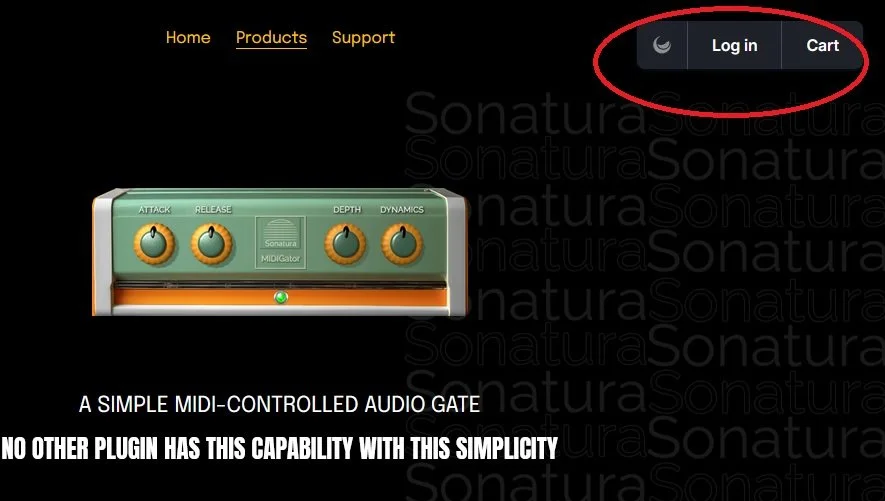
In any event, once the blockers are removed, you should see the three account buttons (as shown in the pic to the right) on the upper right-hand side of the screen. Once you press the button for purchase, that will start the cart up automatically.
-
First of all, check your spam or junk folder. If you’re still sure it hasn’t arrived, send us a note, and we’ll generate a new password for you.
-
This is typically because of write permissions. Try authorizing offline, and save the auth file to your hard drive. Then, do this:
Open Finder, click Go in the menu bar, then Go to Folder...
Type one of these locations, depending on your plugin:
~/Library/Sonatura Audio/midigator/~/Library/Sonatura Audio/superhet/
~/Library/Sonatura Audio/amp-sim-solid-soul/
~/Library/Sonatura Audio/amp-sim-noir-tones/
and hit enter. See that tilde (~) in the address? That’s crucial. It looks for YOUR directory, not the system-wide directory.Manually copy the license.mb file into that folder
Open the plugin and you should be good!
Contact us About Other Stuff.
Email us at
support@sonaturasupport.com
We’ll get back to you, usually within 24 hours, often much sooner.